How to Automate Business Workflows Without Breaking Your Operations
Learn how to automate business workflows that waste time, create errors, and slow customer delivery. This practical guide shows which workflows to automate first, what data to prepare, and how to avoid expensive automation mistakes.
Ronald Mugisha
Head of Data & AI
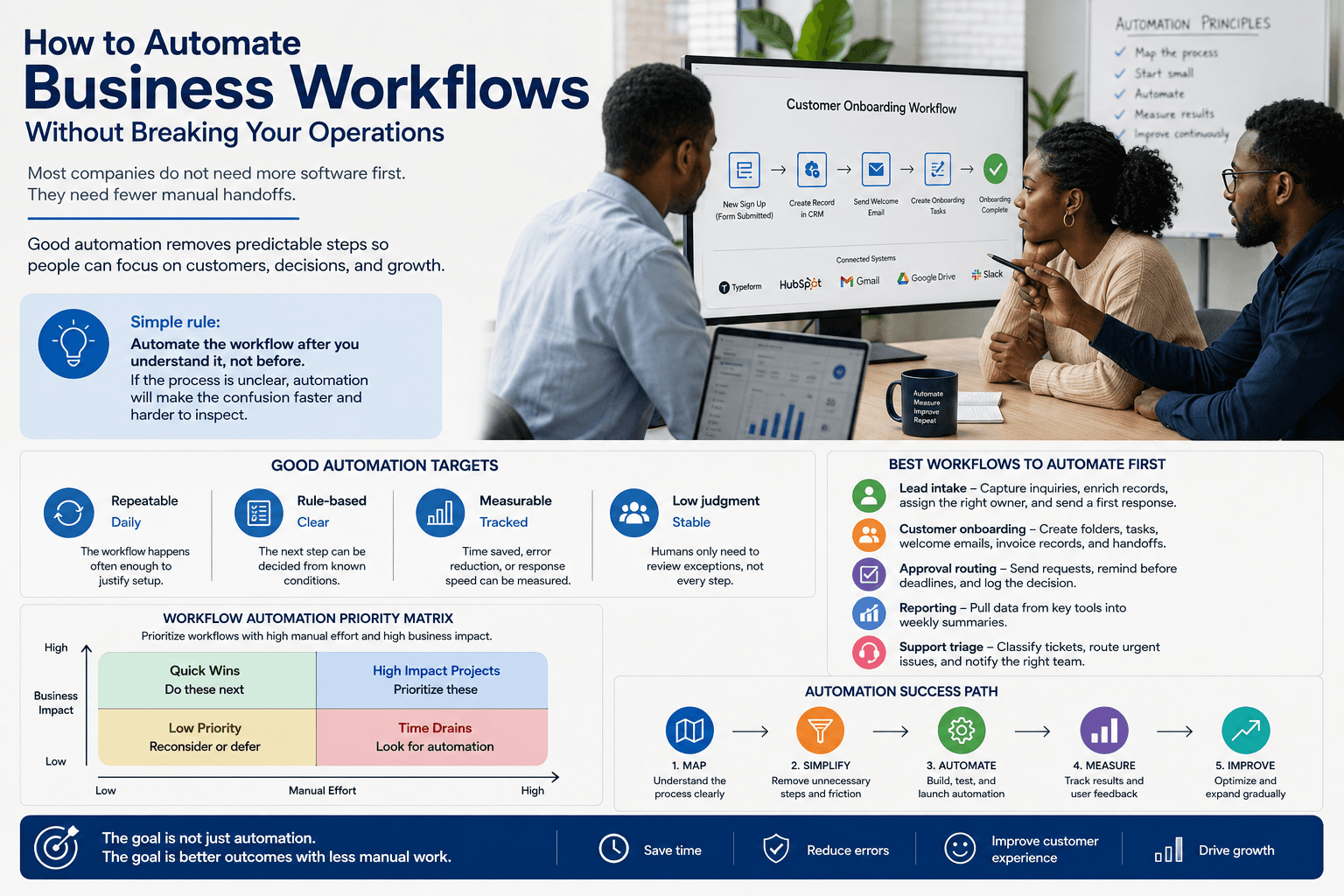
Most companies do not need more software first. They need fewer manual handoffs. When teams copy data from forms into spreadsheets, chase approvals in chat, manually assign leads, or rebuild the same weekly report, the business is paying a hidden operations tax every day.
To automate business workflows well, start with the repeatable work that already has clear rules. Good automation does not replace strategy or judgment. It removes predictable steps so people can spend more time on customers, decisions, and growth.
Simple rule: automate the workflow after you understand it, not before. If the process is unclear, automation will make the confusion faster and harder to inspect.
What Workflow Automation Really Means
Workflow automation is the use of software to move work through a defined process without requiring a person to trigger every step manually. That can mean routing a new inquiry to the right person, creating a task when a deal reaches a certain stage, sending reminders when approvals stall, or updating a dashboard when a customer completes onboarding.
IBM describes business process automation as using technology to automate repeatable business processes, while Microsoft’s guidance emphasizes mapping workflows first, selecting high-value processes, and expanding gradually. That sequence matters: map, simplify, automate, measure.
Good Automation Targets
The strongest candidates usually share these characteristics.
Repeatable
Daily
The workflow happens often enough to justify setup.
Rule-based
Clear
The next step can be decided from known conditions.
Measurable
Tracked
Time saved, error reduction, or response speed can be measured.
Low judgment
Stable
Humans only need to review exceptions, not every step.
The Best Workflows to Automate First
The best first workflow is rarely the most impressive one. It is usually the boring workflow that happens every day, touches more than one system, and causes visible delay when someone forgets a step.
- Lead intake: capture website inquiries, enrich the record, assign the right owner, and send a first response.
- Customer onboarding: create folders, tasks, welcome emails, invoice records, and internal handoff notes.
- Approval routing: send requests to the right person, remind them before deadlines, and log the decision.
- Reporting: pull data from sales, finance, operations, or marketing tools into a weekly summary.
- Support triage: classify tickets, route urgent issues, and notify the right team immediately.
Workflow Automation Priority Matrix
A practical scoring example: prioritize workflows with high manual effort and high business impact.
View chart data
| workflow | Manual effort | Business impact |
|---|---|---|
| Lead intake | 8 | 9 |
| Onboarding | 9 | 8 |
| Approvals | 7 | 7 |
| Reporting | 8 | 6 |
| Support triage | 6 | 8 |
Score each workflow from 1 to 10. Start where manual effort and business impact are both high. Source: VeilCode workflow automation assessment model
Workflow Automation Examples by Department
Different teams experience workflow friction differently. Sales loses time on follow-up. Operations loses time on coordination. Finance loses time reconciling records. Customer support loses time deciding who should handle what. The automation design should match the department’s actual bottleneck.
- 1Sales: when a form is submitted, create a CRM lead, assign by region or deal size, send a personalized email, and notify the sales owner.
- 2Operations: when a project is approved, generate tasks, create client folders, assign kickoff owners, and schedule internal reminders.
- 3Finance: when an invoice is overdue, send a reminder, update the account status, and alert the account manager.
- 4HR: when a candidate accepts an offer, send onboarding forms, create checklist tasks, and notify payroll.
- 5Marketing: when a campaign launches, collect performance data, update dashboards, and send weekly summaries.
Where Automation Usually Saves Time
A sample breakdown of time savings after automating common administrative workflows.
View chart data
| area | Hours saved per month |
|---|---|
| Data entry | 28 |
| Follow-up reminders | 18 |
| Reporting | 22 |
| Approvals | 14 |
| Task creation | 12 |
Use this as a planning model, then replace with your own measured baseline after implementation. Source: Example based on common SME workflow audit patterns
How to Score a Workflow Before Automating It
Before you automate business workflows, score each candidate. This prevents teams from spending weeks automating a process that only happens twice a month or still depends on unclear human judgment.
- Frequency: does this happen daily or weekly?
- Volume: how many records, requests, tickets, or approvals move through it?
- Rule clarity: can the next step be determined from known fields?
- Error cost: what happens when the workflow is delayed or handled incorrectly?
- System access: do the tools involved have APIs, exports, webhooks, or integrations?
Expected Efficiency Gain Over the First 90 Days
Workflow automation usually improves in stages: launch, exception handling, then optimization.
View chart data
| period | Estimated efficiency gain |
|---|---|
| Week 1 | 15 |
| Week 2 | 24 |
| Month 1 | 38 |
| Month 2 | 52 |
| Month 3 | 61 |
The biggest gains usually appear after exception handling and reporting are refined. Source: VeilCode implementation planning model
Common Mistakes That Make Automation Fail
Automation fails when companies automate symptoms instead of processes. If every approval is urgent, the problem may be unclear ownership. If every report needs manual correction, the problem may be inconsistent source data. If every customer handoff is late, the problem may be missing workflow visibility.
A Practical Implementation Roadmap
- 1Map the current workflow: document the trigger, inputs, decisions, systems, people, and final output.
- 2Remove unnecessary steps: do not automate approvals, spreadsheets, or handoffs that should not exist.
- 3Define exception rules: decide when a human should review, approve, reject, or override the automation.
- 4Build a small version first: automate one workflow path before covering every edge case.
- 5Measure before and after: track cycle time, error rate, response time, and manual touches.
- 6Expand gradually: add more workflows only after the first one is stable and trusted.
Final Checklist
- The workflow is repeatable and happens often.
- The trigger is clear, such as a form submission, status change, payment, or new record.
- The required data exists in a consistent format.
- The business rules are documented.
- A human review path exists for exceptions.
- The automation has an owner.
- Success metrics are defined before launch.
The goal is not to automate everything. The goal is to automate the right workflows so the business becomes faster, more consistent, and easier to manage. Start with one painful process, prove the value, then build an automation system the team can trust.
Stay Sharp on What Matters
Engineering deep-dives, design thinking, and practical AI — written for builders who care about craft. No fluff. No spray.
No spam. Unsubscribe any time.